Wave Arts TrackPlug DSP AAX Plug-in
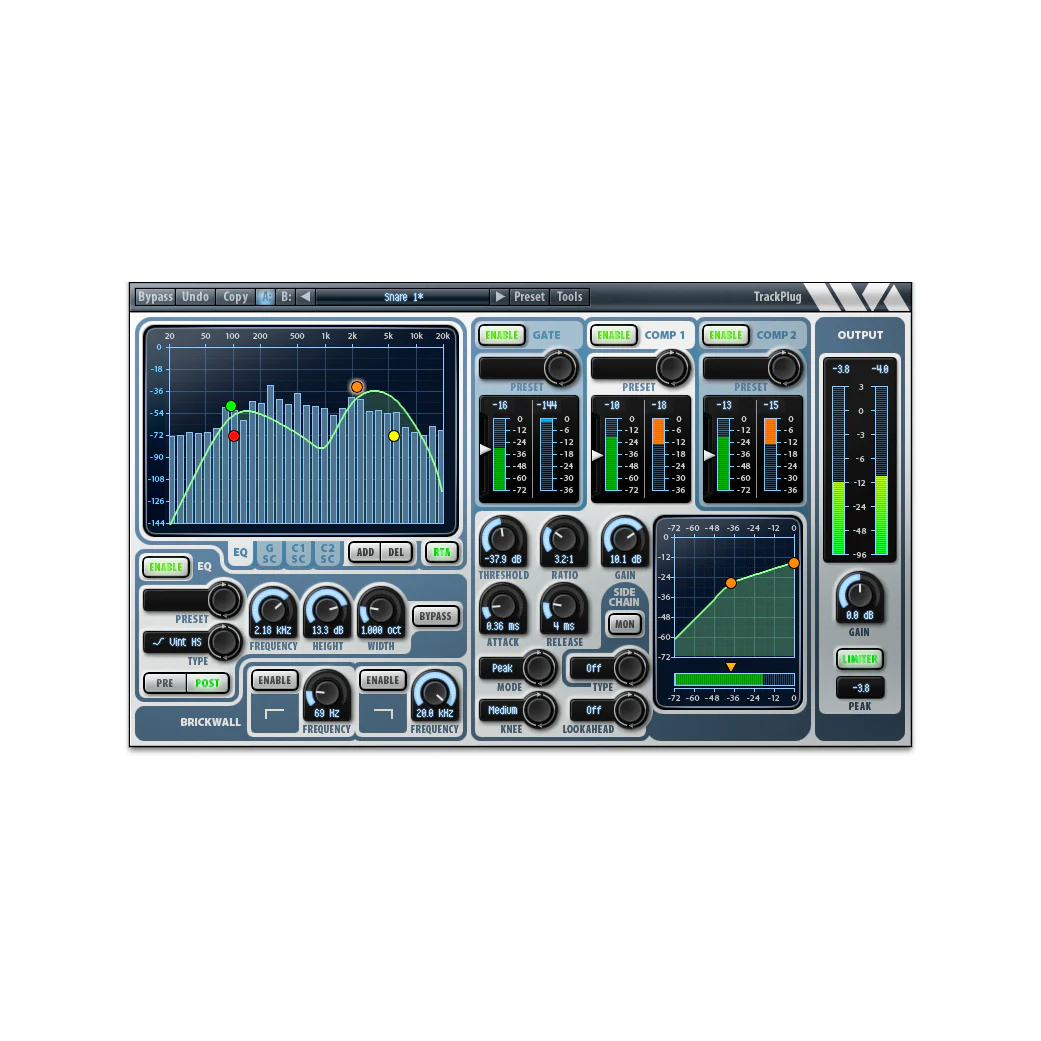
TrackPlugAAXDSPbrings our great sounding and easy to use channel strip to yourHDXDSPsystem. TrackPlug is our most popular plug-in, an all-in-one channel strip which features a 10-band EQ, brickwall filters, dual compressors, gate/expander, extensive sidechain options, and a peak limiter.
TrackPlug’s interface has been meticulously designed for visual clarity and ease of use. For example, the EQ interface lets you add a new EQ band by double-clicking, then you drag the control point to change frequency and height, right-click (shift-click on Mac) to change width. Right-clicking on a meter or display axis gives a popup menu of display ranges. Right-click a knob drag to get fine tune adjustment, double-click a knob to revert to default value. And so on.
Our preset manager lets you A/B compare two different presets or undo the last change. TrackPlug also features preset managers per section so for example you can quickly combine an EQ preset with a compressor preset. Super handy.
The applications for TrackPlug are virtually endless: shape the tone of an instrument, fix sonic problems, bring dynamics under control, clean up noise problems, add some punch or vintage warmth to a track, de-ess a vocal track, and much more! The outstanding user interface puts the power of TrackPlug under your control.
In order to maximize yourDSPinstance counts, TrackPlugAAXDSPcomes in three configurations. The full configuration provides all features (realtime spectrum analysis is only available when runningAAXNative format). The E7GC configuration provides a 7-band EQ, gate and compressor. The E7C configuration provides a 7-band EQ and compressor. At 48 kHz sampling rate, you can run 3 stereo instances of the full configuration perDSPchip, 6 stereo instances of E7GC, and 7 stereo instances of E7C.
Product Information
Product Information
Shipping & Returns
Shipping & Returns
Wave Arts TrackPlug DSP AAX Plug-in
Wave Arts TrackPlug DSP AAX Plug-in
TrackPlugAAXDSPbrings our great sounding and easy to use channel strip to yourHDXDSPsystem. TrackPlug is our most popular plug-in, an all-in-one channel strip which features a 10-band EQ, brickwall filters, dual compressors, gate/expander, extensive sidechain options, and a peak limiter.
TrackPlug’s interface has been meticulously designed for visual clarity and ease of use. For example, the EQ interface lets you add a new EQ band by double-clicking, then you drag the control point to change frequency and height, right-click (shift-click on Mac) to change width. Right-clicking on a meter or display axis gives a popup menu of display ranges. Right-click a knob drag to get fine tune adjustment, double-click a knob to revert to default value. And so on.
Our preset manager lets you A/B compare two different presets or undo the last change. TrackPlug also features preset managers per section so for example you can quickly combine an EQ preset with a compressor preset. Super handy.
The applications for TrackPlug are virtually endless: shape the tone of an instrument, fix sonic problems, bring dynamics under control, clean up noise problems, add some punch or vintage warmth to a track, de-ess a vocal track, and much more! The outstanding user interface puts the power of TrackPlug under your control.
In order to maximize yourDSPinstance counts, TrackPlugAAXDSPcomes in three configurations. The full configuration provides all features (realtime spectrum analysis is only available when runningAAXNative format). The E7GC configuration provides a 7-band EQ, gate and compressor. The E7C configuration provides a 7-band EQ and compressor. At 48 kHz sampling rate, you can run 3 stereo instances of the full configuration perDSPchip, 6 stereo instances of E7GC, and 7 stereo instances of E7C.
Original: $199.95
-65%$199.95
$69.98Product Information
Product Information
Shipping & Returns
Shipping & Returns
Description
TrackPlugAAXDSPbrings our great sounding and easy to use channel strip to yourHDXDSPsystem. TrackPlug is our most popular plug-in, an all-in-one channel strip which features a 10-band EQ, brickwall filters, dual compressors, gate/expander, extensive sidechain options, and a peak limiter.
TrackPlug’s interface has been meticulously designed for visual clarity and ease of use. For example, the EQ interface lets you add a new EQ band by double-clicking, then you drag the control point to change frequency and height, right-click (shift-click on Mac) to change width. Right-clicking on a meter or display axis gives a popup menu of display ranges. Right-click a knob drag to get fine tune adjustment, double-click a knob to revert to default value. And so on.
Our preset manager lets you A/B compare two different presets or undo the last change. TrackPlug also features preset managers per section so for example you can quickly combine an EQ preset with a compressor preset. Super handy.
The applications for TrackPlug are virtually endless: shape the tone of an instrument, fix sonic problems, bring dynamics under control, clean up noise problems, add some punch or vintage warmth to a track, de-ess a vocal track, and much more! The outstanding user interface puts the power of TrackPlug under your control.
In order to maximize yourDSPinstance counts, TrackPlugAAXDSPcomes in three configurations. The full configuration provides all features (realtime spectrum analysis is only available when runningAAXNative format). The E7GC configuration provides a 7-band EQ, gate and compressor. The E7C configuration provides a 7-band EQ and compressor. At 48 kHz sampling rate, you can run 3 stereo instances of the full configuration perDSPchip, 6 stereo instances of E7GC, and 7 stereo instances of E7C.